Crop
Crop trims the frame to a new composition or aspect ratio.
Parameters
| Parameter | Type | Options / Range | Default | What it does |
|---|---|---|---|---|
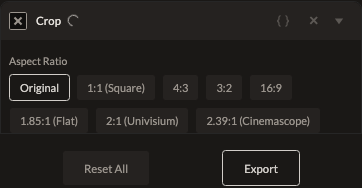
| Aspect Ratio | enum | original, 1:1, 4:3, 3:2, 16:9, 1.85:1, 2:1, 2.39:1, 2:3, 3:4, 9:16 | original | Constrains the crop rectangle to a fixed ratio, or leave it freeform. |
| X | number | pixels | 0 | Horizontal offset of the crop rectangle. |
| Y | number | pixels | 0 | Vertical offset of the crop rectangle. |
| Width | number | pixels | full width | Crop rectangle width. |
| Height | number | pixels | full height | Crop rectangle height. |
How it works
Drag the crop rectangle directly in the editor rather than typing pixel values. If the computed crop rectangle covers the entire frame, no crop is applied at render time — there's no cost to adding a Crop filter you ultimately leave at full frame.
See also
Rotate and Flip for other framing adjustments.
Control preview
JSON structure
{
  "id": "crop",
  "enabled": true,
  "params": {
    "aspectRatio": "original",
    "x": 0,
    "y": 0,
    "width": 0,
    "height": 0
  }
}