Luma Key
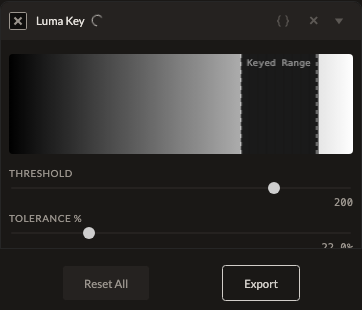
Luma Key keys out transparency based on brightness rather than color — useful when what you want to remove isn't a consistent color (like a green screen) but a consistent brightness (like a bright white background).
Parameters
| Parameter | Type | Range | Default | What it does |
|---|---|---|---|---|
| Threshold | number | 0 to 255 | ~200 | The brightness level that gets keyed to transparency. |
| Tolerance | number | 0 to 100% | 22% | How far from the threshold a pixel can be and still be keyed. |
| Softness | number | 0 to 100% | 0% | Softens the transition at the edge of keyed regions. |
Note: unlike most other filters, Luma Key has no true no-op setting — once enabled, it always keys out something (even at a Threshold of 0, near-black pixels are keyed). Toggle the filter's enabled state off entirely if you want to temporarily disable keying rather than adjusting Threshold to try to neutralize it.
See also
Chroma Key keys by color instead of brightness.
Control preview
JSON structure
{
  "id": "lumakey",
  "enabled": true,
  "params": {
    "threshold": 200,
    "tolerance": 22,
    "softness": 0
  }
}