Chroma Key
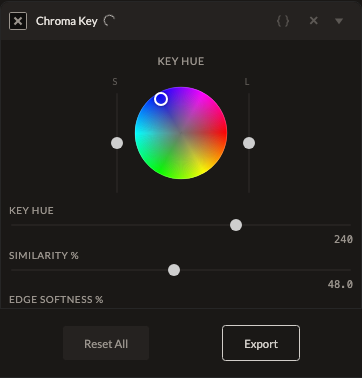
Chroma Key keys out a single hue — like a green screen — to transparency, for compositing over another background.
Parameters
| Parameter | Type | Range | Default | What it does |
|---|---|---|---|---|
| Key Hue | number | 0° to 360° | 240° | The hue to key out to transparency. |
| Similarity | number | 0 to 100% | 22% | How close a color needs to be to the key hue to be keyed out. |
| Edge Softness | number | 0 to 100% | 0% | Softens the transition at the edge of keyed regions. At 100%, keying is fully applied. |
| Invert | toggle | off | Keys out everything except the target hue instead. |
How it works
Applied after color grading is converted to final display color, but before any LUT in your stack — so keying happens on your graded colors, not the raw source, but any final look-up-table grade is applied after the transparency is established.
See also
Chroma Hold desaturates instead of keying to transparency; Luma Key keys by brightness instead of color.
Control preview
JSON structure
{
  "id": "chromakey",
  "enabled": true,
  "params": {
    "hold": 240,
    "similarity": 22,
    "blend": 0,
    "invert": false
  }
}