Sharpen
Sharpen increases perceived edge contrast and detail using an unsharp mask — the standard sharpening tool for correcting slightly soft focus or adding crispness before export.
Parameters
| Parameter | Type | Range | Default | What it does |
|---|---|---|---|---|
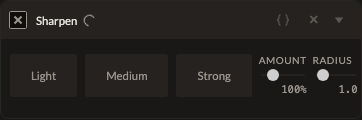
| Amount | number | 0 to 500% | 100% | Sharpening strength. |
| Radius | number | 0.1 to 10 | 1 | Declared in the schema, but currently has no effect on the render — the kernel size is fixed internally. |
| Threshold | number | 0 to 255 | 0 | Minimum edge contrast required before sharpening is applied, to avoid amplifying noise in flat areas. |
Note: the Radius slider is present in the editor but doesn't currently change the sharpening kernel used — only Amount and Threshold have an audible/visible effect. If a specific radius matters for your workflow, Smart Blur and Texture both expose a working radius-like control for related effects.
See also
Texture and Adjustments' Clarity control apply sharpening-style enhancement at different detail scales.
Control preview
JSON structure
{
  "id": "sharpen",
  "enabled": true,
  "params": {
    "amount": 100,
    "radius": 1,
    "threshold": 0
  }
}