Adjustments
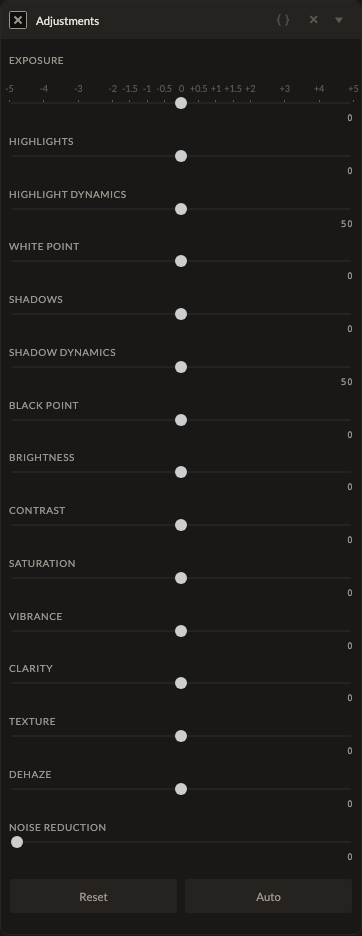
Adjustments is the broad, all-in-one panel for quick edits — exposure, highlight/shadow recovery, brightness, contrast, saturation, vibrance, clarity, texture, dehaze, noise reduction, and black/white point, all in a single filter instance rather than stacking many separate ones.
Parameters
| Parameter | Type | Range | Default | What it does |
|---|---|---|---|---|
| Exposure | number | -5 to 5 EV | 0 | Overall brightness gain, same as the standalone Exposure filter. |
| Highlights | number | -100 to 100 | 0 | Recovers (negative) or boosts (positive) highlight detail. |
| Highlight Dynamics | number | 0 to 100 | 50 | Controls the rolloff/reach of the Highlights adjustment. |
| Shadows | number | -100 to 100 | 0 | Recovers (positive) or crushes (negative) shadow detail. |
| Shadow Dynamics | number | 0 to 100 | 50 | Controls the rolloff/reach of the Shadows adjustment. |
| Brightness | number | -100 to 100 | 0 | Overall lightness, applied as a gain multiplier. |
| Contrast | number | -100 to 100 | 0 | S-curve strength between shadows and highlights. |
| Saturation | number | -100 to 100 | 0 | Overall color intensity. |
| Vibrance | number | -100 to 100 | 0 | Saturation boost weighted to protect already-vivid colors and skin tones. |
| Clarity | number | -100 to 100 | 0 | Midtone local contrast via a large-radius sharpening pass. |
| Texture | number | -100 to 100 | 0 | Fine-detail enhancement via a small-radius sharpening pass. |
| Dehaze | number | -100 to 100 | 0 | Cuts through (positive) or adds (negative) atmospheric haze. |
| Noise Reduction | number | 0 to 100 | 0 | General denoising strength. |
| Black Point | number | -100 to 100 | 0 | Shifts the shadow tonal zone. |
| White Point | number | -100 to 100 | 0 | Shifts the highlight tonal zone. |
How it works
Exposure, Highlights, and Shadows are pulled out and applied early, in scene-linear space before tone mapping — the same stage the standalone Exposure and Highlights/Shadows filters use, so recovery works on unclipped data. Everything else (Brightness, Contrast, Saturation, Vibrance, Clarity, Texture, Dehaze, Noise Reduction, Black/White Point) runs later, after tone mapping, alongside the other color and detail filters. Clarity and Texture are both implemented as unsharp-mask passes at different radii — Clarity uses a wide 13×13 kernel for broad local contrast, Texture a tight 3×3 kernel for fine detail.
See also
For single-purpose control instead of the all-in-one panel: Exposure, Highlights/Shadows, Contrast, Saturation, Vibrance, Texture, Dehaze.
Control preview
JSON structure
{
  "id": "adjustments",
  "enabled": true,
  "params": {
    "exposure": 0,
    "highlights": 0,
    "highlightDynamics": 50,
    "shadows": 0,
    "shadowDynamics": 50,
    "brightness": 0,
    "contrast": 0,
    "saturation": 0,
    "vibrance": 0,
    "clarity": 0,
    "texture": 0,
    "dehaze": 0,
    "noiseReduction": 0,
    "blackPoint": 0,
    "whitePoint": 0
  }
}