Photo Filter
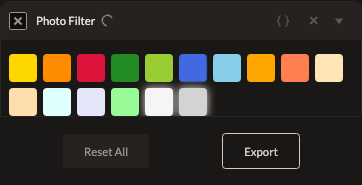
Photo Filter simulates a classic lens color filter — the physical glass filters photographers have screwed onto lenses for decades, from warming filters to soft-focus diffusion.
Parameters
| Parameter | Type | Default | What it does |
|---|---|---|---|
| Filter | enum | none | Which physical filter to simulate (see list below). |
| Intensity | number | 100% (0–100%) | How strongly the filter is applied. |
Filter options: Yellow #8/K2, Orange #16/G, Red #25/A, Green #11/X1, Yellow-Green #13, Blue #47, 80A Blue, 85 Orange, 85B Orange, 81A Warming, 81B Warming, 82A Cooling, Skylight 1A, FLD Fluorescent, Black Pro-Mist, Soft Focus.
How it works
Most filters shift color via a channel mix or color-balance style adjustment, scaled by Intensity. Black Pro-Mist and Soft Focus are implemented as a Gaussian blur rather than a true optical diffusion simulation — Intensity controls the blur strength for these two rather than a color shift.
See also
Color Balance and LUT for more precise or more elaborate color grading than a single named filter provides.
Control preview
JSON structure
{
  "id": "photo-filter",
  "enabled": true,
  "params": {
    "filterId": "yellow_8",
    "intensity": 100
  }
}