Selective Color
Selective Color adjusts the CMYK mix of a specific color range — reds, yellows, greens, cyans, blues, magentas, whites, neutrals, or blacks — without affecting the rest of the image. This is the same tool photographers know from Photoshop's Selective Color adjustment layer.
Parameters
Each of the 9 color regions (Reds, Yellows, Greens, Cyans, Blues, Magentas, Whites, Neutrals, Blacks) has the same four controls:
| Parameter | Type | Range | Default | What it does |
|---|---|---|---|---|
| Cyan | number | -100 to 100 | 0 | Adds (positive) or removes (negative) cyan within this color region. |
| Magenta | number | -100 to 100 | 0 | Adds or removes magenta within this color region. |
| Yellow | number | -100 to 100 | 0 | Adds or removes yellow within this color region. |
| Black | number | -100 to 100 | 0 | Adds or removes black (density) within this color region. |
How it works
Only regions you actually adjust are sent to the render pipeline — leaving a region at all zeros has no effect and no cost. Use the region tabs in the editor to switch which of the 9 ranges you're currently adjusting.
See also
Color Balance grades by tonal zone (shadows/midtones/highlights) instead of by hue; Channel Mixer mixes whole RGB channels rather than targeting specific color ranges.
Control preview
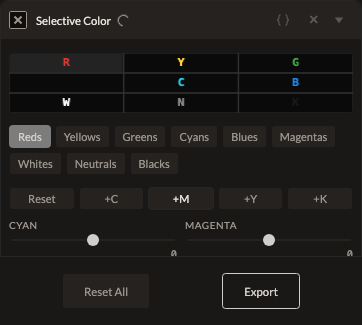
JSON structure
{
  "id": "selective-color",
  "enabled": true,
  "params": {
    "reds_cyan": 0,
    "reds_magenta": 0,
    "reds_yellow": 0,
    "reds_black": 0,
    "yellows_cyan": 0,
    "yellows_magenta": 0,
    "yellows_yellow": 0,
    "yellows_black": 0,
    "greens_cyan": 0,
    "greens_magenta": 0,
    "greens_yellow": 0,
    "greens_black": 0,
    "cyans_cyan": 0,
    "cyans_magenta": 0,
    "cyans_yellow": 0,
    "cyans_black": 0,
    "blues_cyan": 0,
    "blues_magenta": 0,
    "blues_yellow": 0,
    "blues_black": 0,
    "magentas_cyan": 0,
    "magentas_magenta": 0,
    "magentas_yellow": 0,
    "magentas_black": 0,
    "whites_cyan": 0,
    "whites_magenta": 0,
    "whites_yellow": 0,
    "whites_black": 0,
    "neutrals_cyan": 0,
    "neutrals_magenta": 0,
    "neutrals_yellow": 0,
    "neutrals_black": 0,
    "blacks_cyan": 0,
    "blacks_magenta": 0,
    "blacks_yellow": 0,
    "blacks_black": 0
  }
}